
|
If you find this helpful, please click the Google |
 Button

HTML Microdata Tutorial
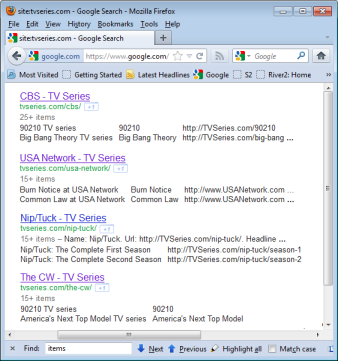
HTML tags provide for semantic markup of text primarily to make web documents more readable by human visitors. It is also possible to mark up structured data in HTML documents for special purposes that are not handled by the standard tags defined in the HTML specification. Microdata is an extension to HTML 5, also known as HTML 5 with Microdata that allows adding some additional structure to HTML documents.
These machine-readable properties can be processed by software searching for specific types of information. Some search engines, Google in particular, already support microdata in HTML 5 and use it to improve search engine results as shown in the results for the CBS, USA and The CW networks and the Nip/Tuck TV Series in the image on the right.
All it takes to implement microdata properties is simply adding a few attributes to existing HTML code. This makes it easier to implement item properties with microdata than with other data formats such as microformats and RDFa.
Microdata can be used to provide information on things like:
| Schema.org schemas | Rich Snippets |
|---|---|
Microdata can also be used by search engines to create a breadcrumb trail, consisting of a series of links, as shown in these results from a Google search:
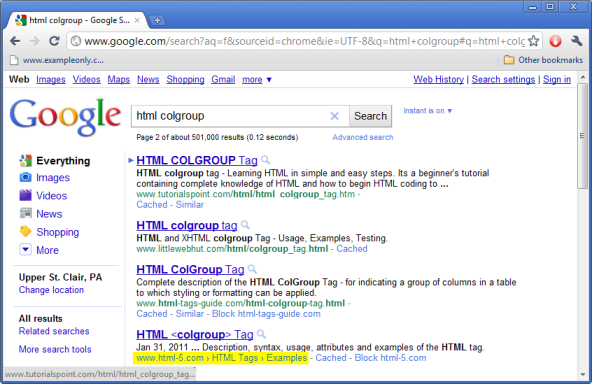
Compare how Google displays a breadcrumb trail (highlighted in yellow) based on microdata properties obtained from the HTML 5 web site where a URL appears for other web sites.
Definitions
- property
- A property is a simple data structure consisting of a name and a value, also known as a name-value pair. The HTMLPropertiesCollection interface provides access to a collection of properties.
Item Properties
...
<itemelem itemscope="itemscope" itemtype="item-type-url">
   ...
   <propelem itemprop="property-name">property-value</propelem>
   ...
   <propitem itemprop="property-name"
      itemscope="itemscope" itemtype="item-type-url">
      ...
   </propitem>
   ...
</itemelem>
...
To add microdata to HTML code:
- Add an
itemscope="itemscope"attribute and anitemtypeattribute to the parent element of the HTML code that describes the properties of the item. - If there are other properties outside the microdata item element, include an
itemrefattribute with a list of theiridattributes. - Add an
itempropattribute to each element that represents a property of the item. The value of this attribute is the name of the property.- The
itempropattribute can specify a list of property names separated by spaces only if those properties all have the same value. - More than one element may have a
itempropattribute with a given value if the property has more than one value. - The value of a property may be another item, indicated by an
itemscope="itemscope"attribute and its ownitemtypeattribute.
The value of the property depends on the HTML element type as shown in the table below.
- The
Item Property Values
(values associated with itemprop attributes)
The value of a property is usually part of the regular content of the HTML document, often provided by the text content of the HTML element where the itemprop attribute is coded. The property value can also be another microdata item or, for a small set of HTML element types, the value of a specific attribute as indicated in the following table:
| Element | Value Source | Value Space |
|---|---|---|
any element with an itemscope="itemscope" attribute | microdata item defined by the element | any microdata item |
| a | <a href> attribute | an absolute URL |
| area | <area href> attribute | an absolute URL |
| audio | <audio src> attribute | an absolute URL |
| embed | <embed src> attribute | an absolute URL |
| iframe | <iframe src> attribute | an absolute URL |
| img | <img src> attribute | an absolute URL |
| link | <link href> attribute | an absolute URL |
| meta | <meta content> attribute | any string |
| object | <object data> attribute | an absolute URL |
| source | <source src> attribute | an absolute URL |
| time | <time datetime> attribute | datetime="yyyy-mm-ddThr:mi:ss.fracTZfor date and time, datetime="yyyy-mm-ddfor date only or datetime="hr:mi:ss.fracTZfor time only |
| track | <track src> attribute | an absolute URL |
| video | <video src> attribute | an absolute URL |
| any other element type | the text content of the element | any text |
When the property value is part of a longer area of text content, a span element can be added to identify the part that is the value of the microdata property. When the value is not already part of the document, a <meta/> tag with a text value in the content attribute or a <link/> tag with a URL in the href attribute can be added to the HTML code.
Item List vs. HTML list
Wrong!
Because an Item List is a type of Creative Work, you would not use an Item List to itemize the values of a multi-valued property, such as for the ingredients in a recipe:
<div itemscope="itemscope" itemtype="http://schema.org/Recipe">
   <h1 itemprop="name">Chicken Recipe</h1>
   Ingredients:
   <ul itemprop="ingredients" itemscope="itemscope" itemtype="http://schema.org/ItemList">
      <li itemprop="itemListElement">chicken breasts</li>
      <li itemprop="itemListElement">cream of chicken soup</li>
      <li itemprop="itemListElement">Swiss cheese</li>
   </ul>
</div>
Again, this is not correct, even though the Rich Snippets Testing Tool will parse it and show the list item as the value of the multi-valued property as you would expect if an Item List was a data type rather than a Creative Work.
Correct
Instead, repeat the itemprop attribute for each value in the list:
<div itemscope="itemscope" itemtype="http://schema.org/Recipe">
   <h1 itemprop="name">Chicken Recipe</h1>
   Ingredients:
   <ul>
      <li itemprop="ingredients">chicken breasts</li>
      <li itemprop="ingredients">cream of chicken soup</li>
      <li itemprop="ingredients">Swiss cheese</li>
   </ul>
</div>
Microdata Examples
<article itemscope="itemscope" itemtype="http://data-vocabulary.org/Recipe">
   <h1 itemprop="name">Chocolate Pie</h1>
   <section>
      <h2>Ingredients</h2>
      <ul>
         <li itemprop="ingredient" itemscope="itemscope"
            itemtype="http://data-vocabulary.org/RecipeIngredient">
            <span itemprop="amount">8 oz.</span>
            <span itemprop="name">condensed milk</span>
         </li>
         <li itemprop="ingredient" itemscope="itemscope"
            itemtype="http://data-vocabulary.org/RecipeIngredient">
            <span itemprop="amount">12 oz.</span>
            <span itemprop="name">chocolate</span>
         </li>
         <li itemprop="ingredient" itemscope="itemscope"
            itemtype="http://data-vocabulary.org/RecipeIngredient">
            <span itemprop="amount">1</span>
            <span itemprop="name">9" pie crust</span>
         </li>
         <li itemprop="ingredient" itemscope="itemscope"
            itemtype="http://data-vocabulary.org/RecipeIngredient">
            <span itemprop="name">Whipped cream</span> (prepared separately)</li>
      </ul>
   </section>
   <section itemprop="instructions">
      <h2>Preparation</h2>
      <ol>
         <li>Heat condensed milk and chocolate. Do not boil.</li>
         <li>Pour into pie crust. Refrigerate.</li>
         <li>Top with whipped cream.</li>
      </ol>
   </section>
</article>
Microdata Schemas
This list of microdata schemas provides some examples of how HTML microdata can be used:
Schema.org hierarchy
- Thing schema
- CreativeWork schema for a Creative Work, Map, Painting, Photograph, Sculpture, Web Page Element, Web Page Site Navigation Element, Web Page Table, Web Page Ad Block, Web Page Footer, Web Page Header or Web Page Side Bar
- Article schema for an Article, Blog Posting or Scholarly Article
- Blog schema
- Book schema
- ItemList schema
- MediaObject schema
- Movie schema
- MusicPlaylist schema
- MusicRecording schema
- Recipe schema
- Review schema
- TVEpisode schema
- TVSeason schema
- TVSeries schema
- WebPage schema for an About Page, , Checkout Page, generic Collection Page, , Image Gallery Collection Page, Video Gallery Collection Page, Contact Page, Item Page, Profile Page or Search Results Page
- Event schema for a Business Event, Childrens Event, Comedy Event, Dance Event, Education Event, Festival, Food Event, Literary Event, Music Event, Sale Event, Social Event, Sports Event, Theater Event, User Interaction, User Blocks, User Checkins, User Downloads, User Likes, User Page Visits, User Plays, User Plus Ones or User Tweets
- Intangibles
- Organization schema
- Person schema
- Place schema
- Product schema
- CreativeWork schema for a Creative Work, Map, Painting, Photograph, Sculpture, Web Page Element, Web Page Site Navigation Element, Web Page Table, Web Page Ad Block, Web Page Footer, Web Page Header or Web Page Side Bar
Other Microdata Schemas
- Breadcrumb Trails
- Breadcrumb microdata can be used to provide search engines with a breadcrumb trail, which provides a sequence of links (breadcrumbs) based on the hierarchical navigation of a web site. When available, Google displays a breadcrumb trail in the search results instead of a simple link, providing access to multiple pages on the site instead of just a single page.
- Creative Works
- Google Rich Snippets
- Rich Snippets include: