
|
If you find this helpful, please click the Google |
 Button

New Tags in HTML 5 and Changes
Document Sections in HTML
One of the most significant new features of HTML 5 is the ability to mark up sections of an HTML document using the sectioning tags and related tags, which can identify types of content within a section such as headers, footers and sidebars displayed along with a web page.
Embedding audio and video in HTML 5
There are new tags in HTML 5 that can be used to embed video or audio content in web pages.
Other New Tags in HTML 5
- <canvas> tag
- <command> tag
<datagrid> tag- <datalist> tag
- <datatemplate> tag
- <details> tag
- <dialog> tag
- <embed> tag
- <figcaption> tag
- <figure> tag
- <keygen> tag
- <mark> tag
- <meter> tag
- <output> tag
- <progress> tag
- <ruby>, <rt> and <rb> tags
- <rule> tag
- <summary> tag
- <time> tag
- <wbr> tag
Changes to existing HTML tags
- DOCTYPE declaration for HTML 5
- There is no DTD in HTML 5. This makes the HTML 5 DOCTYPE declaration much simpler and easier to remember.
- <html> tag for HTML 5
- In HTML 5, the <html> tag is the same as for the 2000-2010 Recommendations from the W3C HTML Working Group, which includes an
xmlnsattribute with the namespace URI assigned for HTML elements in 1999. The 1997 HTML 4 standard did not include namespaces yet. - col element
- The <col> tag for an HTML table column should not be coded without a colgroup element as its parent.
- HTML definition lists
The definition list, definition term and definition description elements are now called description list, description term and detail description respectively. To define a list of terms using the <dl> tag, such as for a glossary, each term defined should be identified by putting it inside a dfn element.
Other differences between HTML 4 / xHTML and HTML 5
- Coding special characters in HTML without a DTD
- Because there is no HTML 5 DTD, decimal or hexadecimal numerical values should be used coding HTML character entities. For a handy reference of special characters in HTML, see HTML Character Codes.
- alternative HTML syntax standards
- For backward compatibility with most existing web pages, HTML 5 allows documents to be coded using either the syntax traditionally used for the 1997-1999 versions of HTML (version 4.x), or the 2000-2001 W3C extended HTML syntax, which is more mobile-friendly and allows using templates. (For example, compare how a site such as this one looks on a mobile device with how other sites such as WhiteHouse.gov look.)
- An HTML page can be coded such that it adheres to a common subset of the syntactic requirements that are shared by both syntaxes and avoids anything that is unique to one syntax or the other. HTML documents that can be properly delivered and processed as either syntactic flavor of HTML are known as polyglot HTML documents.
- attribute coding for polyglot HTML documents
There are some specific requirements for coding attributes in HTML documents that can be parsed using either set of syntax rules. Coding of attributes, even boolean attributes, must include an equal sign and value, and the value must always be enclosed in quotes. The value of a boolean attribute must be the name of the attribute itself or else the attribute must be omitted - the value of a boolean attribute should not be
true,false, omitted (a minimized attribute) or an empty string.<option selected="selected"/>
The following ways of coding HTML attributes should be avoided:
<option selected/>
<option selected=""/>
<option selected="true"/>
<option selected="yes"/>
- HTML 5 Specifications focus on the DOM
- The specifications for HTML 5 define elements of the language in terms of the operation and effects of the document's internal object model, making HTML 5 more of an abstract language than earlier versions. As a result, the language can be encoded in more than one syntax, as determined by the media type (
text/htmlfor the HTML syntax orapplication/xhtml+xmlfor the XML syntax, for example). Documents can even exist without an external representation through using the DOM APIs internally. - Separate rules for creating HTML code vs. parsing HTML
- HTML pages on the web have been somewhat haphazardly created under various different standards and proprietary formats and in many cases with no particular standard or format in mind. As a result, different browser vendors have developed a variety of incompatible methods of handling a lot of non-standard and just plain bad HTML coding.
- There are now different rules for HTML authors and parsing software. The rules for writing HTML code have been simplified, but are more strict in that errors may be generated for some types of invalid coding, such as mismatched tags. The rules for parsing HTML are also more precise, especially for how to handle non-standard HTML documents that do not follow the authoring rules.
- For backward compatibility with the majority of existing documents, the HTML 5 specification requires document parsers and viewers (browsers) to support older, deprecated elements and attributes and other non-standard HTML coding in as consistent manner as possible. This means that HTML 5 compliant user agents will gracefully handle some of the more common errors in HTML coding. It's sort of a "Do What I Mean, Not What I Say" feature of web browsers. It also means that different browsers should start handling certain types of errors in the coding of HTML documents in a more consistent and predictable way.
- In layman's terms, there are two different branches of the HTML standard - one for HTML authors and another for developers of browsers and other software that needs to parse HTML code. While browsers may recognize deprecated and non-standard HTML coding, developers creating new HTML pages should avoid deprecated HTML elements and attributes and try to create documents that conform to the authoring requirements of the HTML 5 specification. The benefits of adhering to the HTML authoring rules include:
- more consistent presentation in traditional web browsers from different vendors,
- better support in handheld and mobile devices with smaller screens and
- greater longevity of the HTML pages being created.
- Separation of main content and navigation
- Earlier versions of HTML were not designed with accessibility in mind. Web page designers created some workarounds such as "Skip Navigation" links (similar to "Skip Intro" buttons), which would be placed near the beginning of web pages to allow users "viewing" a site with an HTML screen reader to keep the software from having to vocalize the navigation links on every page.
- HTML 5 continues to support XSL style sheets, which allow the navigation and other common elements to be completely removed from the documents with the main content and placed in one or more style sheet documents. The advantages of separating the navigation from the main content include:
- making the web pages more accessible, by not forcing screen readers to vocalize all of the navigation links before getting to the main content
- centralizing the "look and feel" of the web site using the templates in the style sheet documents
- improving page load times, since the style sheet documents can be cached by the browser and downloaded just once as opposed to when the common navigation elements are wrapped around the content and downloaded again and again with every web page
- making the web pages more mobile-friendly
HTML 5 Meters and Progress Bars
Gauges on a web page provide a visual indication of the current value of a measurement between some minimum value and a maximum value. A "meter", which is analogous to a needle gauge, shows the current value in relation to the minimum and maximum values. A progress bar shows how far a task has progressed between the start of the task and the estimated completion of it. The tags for creating gauges in HTML 5 include:
Beyond HTML 5
As shown in the Venn diagram below, development of the HTML Living Standard originally coincided with HTML 5 development, but diverged in early 2011. A few features added to the specification after that point were still considered to be part of HTML 5, although most were not. For example, the u (underline) element, which was added back into the HTML Living Standard by a Working Group decision on April 8, 2011 (WHATWG revision r6004 for Bug #10838), is considered to be part of HTML 5 even though the change was after the divergence.
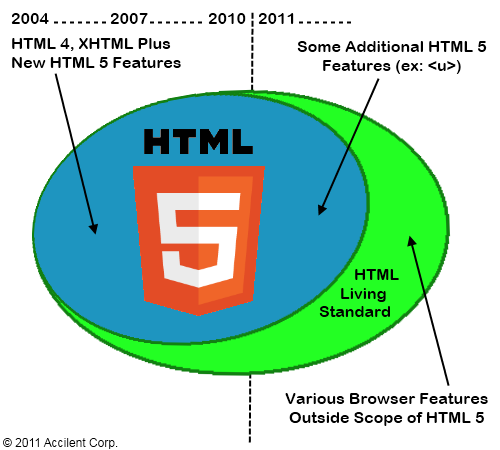
Web Development Technologies Beyond HTML 5
Some of the web development technologies beyond the scope of HTML 5 are: